Thursday, December 7, 2017

Command of the Day - PowerShell

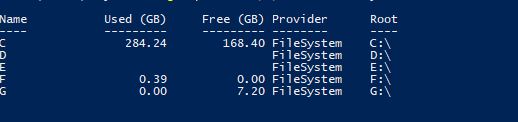
I wanted to list disk drives in Windows (not with DISKPART) using PowerShell. I wanted the output to look something similar to the one you get on a Linux OS.

sudo fdisk -l gives and output like this.


*sudo is required as Linux won't let you run these commands under a normal user.

After trying to be funky with variables to get the output of the 'wmic logicaldisk GET VolumeName, Size, Caption to show up in Gigabytes I had given up until I realised Powershell has a built-in command let to just do something like that!

get-psdrive –psprovider filesystem


Sometimes it takes a failed attempt to get to a successful place!

Bit happening - a lot to look forward to...

Kia Ora folks, you would have recently noticed a lot more activities on this blog, yes, finally I have got the time and the ideas to move this blog forward. 

It was more to do with time then ideas as the idea behind the blog remains the same to talk about technology (Linux, Windows, Android, IoS, Cisco, Juniper etc..). 

I am not a person who would take a position in one camp, I love to be part of technology, be it done by the good folks at the Free Software Foundation or the big monopolies. 

As long as technology removes barriers to communication, enriches lives and most importantly makes us all better humans I do not mind which camp does it or does it together.

Moving on to the blog, it has now been moved to a proper domain so when you type in http://www.korutech.services that us right here :).

More pages will be added to categorise Linux, AWS and other technologies which gives makes for a better reading which reminds me, I am reading Neil DeGrasse Tyson's Astrophysics for people in a hurry a fascinating book for someone who is curious about space and our existence but does not have the time to read through 1000s of pages. Give it a go and as always stay sharp, stay ahead, do not drink and drive.

P.S. Proud to have become a member of the Free Software Foundation.


Sunday, December 3, 2017

Command of the day - Linux

Ever wanted to know how much fish (disk space) the Penguin is gobbling up?

Well, use the following command to find out.

'df'

Simple?

It is a simple yet powerful little command.

At the terminal type in df and you will get an output which looks something like the one down below.


Did you say the robots have still not taken over?

If you wanted a human-readable format, issue the following command 'df -h'


A big shout out to the masters at Computer Hope UK and if you want to learn more head on over to Computer Hope.


List of Open Applications through Power Shell

I wanted to know how to display a list of open applications using Power Shell.

Bit of tinkering was not helping me and I was running in to errors.

Then I came across a nifty script on StackOverFlow.

https://stackoverflow.com/a/199204/7186525


Original Credit to the author(s)

I know a little late in the game but it is as they say "better late than never".


Installing Hardinfo on Ubuntu

I was determined to find the version and type of desktop interface running on the Ubuntu.

Decided to use 'hardinfo' and lo behold the package was not installed in my Ubuntu.

Well fired up the terminal and ran

sudo -apt intsall hardinfo

OOOPSSS says Ubuntu Error!


Being a newbie to Linux and an old hand on Windows I was a bit sceptical that the error flashing up on the screen would entail me going to 10 different sites to get the answer.
Ran the command as it said and it fixed the issue! #POWEROFLINUX #WINDOWSLINUX #WINLIN #FSF #Freedom

Error corrected everyone happy!


Ohh and what was the version you say #UNITY

Saturday, December 2, 2017

Learning Linux One Command At A Time - Today in History

Learning Linux one command at a time.

Today's command

Calendar


And if you want the output saved to a text file well, 'calendar > test.txt'

Not a good day in history on many counts but that is not the point :)

Thursday, June 22, 2017

30 years old technology to be removed by MS

With the latest round of Windows 10 update around the corner, Microsoft will be getting rid of the aging SMB1 protocol, although the support for the same continues, any new installation or an upgrade of the old one renders the SMB1 protocol uninstalled.

More information can be found here, SMB 1 (Petri)

MS has also collated a list of vendors whose applications still use the 30 year old technology here, MSINFO

Cheers and have a good evening.


Thursday, July 14, 2016

Exchange 70-345

New Pluralsight Course – Designing & Deploying Exchange 2016 (70-345) Mailbox Databases.


Paul's new course is out, and I will surely be signing up to this one on Plural Sight!

The biggest question is why to do an on-premise course when Office 365 is such a rage! 

For starters not everyone is comfortable putting their corporate email in the cloud, some people do like to have control over their emails. And as Paul himself says "The Office 365 certification exams are very light on Exchange coverage, and leave out many key Exchange Online features. Fortunately, you’ll learn a lot from Exchange 2016 training that directly applies to Exchange Online. And all of the topics that are specific to on-premises are still very useful for Hybrid deployments, which are quite common right now". I am not promoting Paul or Plural Sight, I just love Paul's teachings and hope others can gain significantly.

Saturday, July 2, 2016

Sometimes we IT administrators run in to a condition called "laziness". We do not want to type the entire command for Powershell with all its parameters and arguments. Well fear not, just use show and tell.

Type the following in your Powershell command line;

show-command New-Msoluser

Article originally published at 

https://blogs.technet.microsoft.com/heyscriptingguy/2016/06/30/powertip-get-a-gui-interface-for-any-powershell-cmdlet/

Cheers!

Wednesday, November 18, 2015

The Microsoft Platform: Detailed walkthrough on Remote Control (Shadowing)...

Credit goes to Freek Berson


The Microsoft Platform: Detailed walkthrough on Remote Control (Shadowing)...: As you probably know the ability to Remote Control a user in RDS (shadowing) was removed from Windows Server 2012. Freek in this Blog post talks about how to use this in Windows 2012 R2


Thursday, September 3, 2015


If you ever wanted to know how the world is connected!! Click on the link below and be amazed!


For a live view visit the link below

#PowerShell HELP

PowerShell has one of the best help database built in to it, well it still has a long way to go to catch up with the Linux Man pages but yo...